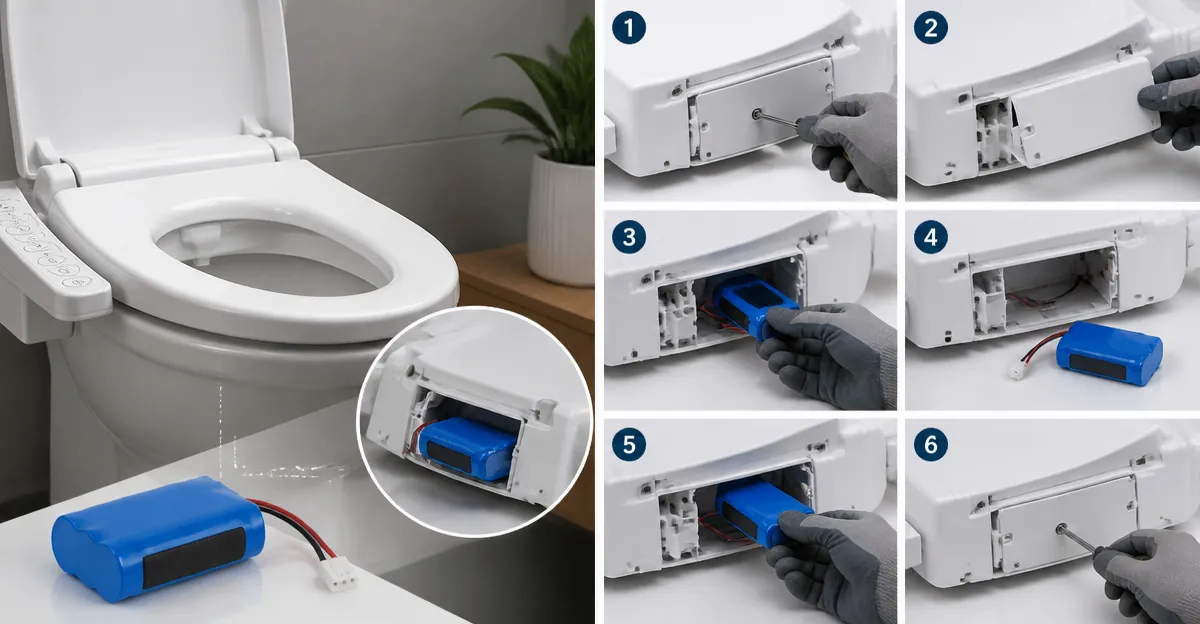
How to Replace a Bidet Seat Battery Pack: Step‑by‑Step DIY Guide for Any Electric Bidet Seat
Introduction
Modern electric bidet seats rely on a small internal battery pack to retain memory settings such as water temperature, nozzle position, and user presets. When the battery depletes, the seat may lose its programmed preferences, causing inconvenience and occasional error messages. This guide explains how to identify, remove, and replace the battery pack in any electric bidet seat safely and efficiently. By following the steps, one can restore full functionality without calling a technician, saving both time and money.
The instructions apply to a wide range of models, including premium options such as the Bio Bidet BB2000 Bliss, the iliD Heated Bidet Seat, and the Alpha Bidet JX2. Understanding the common architecture of these seats makes the process transferable across brands.
What You’ll Need
- Phillips‑head screwdriver (size #2)
- Flat‑head screwdriver (optional for trim removal)
- Multimeter (to verify battery voltage before installation)
- Replacement battery pack compatible with your seat model (often a 3.7 V Li‑ion pack)
- Soft cloth or non‑abrasive cleaning pad
- Protective gloves
All of the above tools are standard household items; however, if a compatible replacement pack is not already on hand, consider purchasing a universal 3.7 V 1500 mAh lithium‑ion pack, which is widely available on Amazon.
Step‑by‑Step Instructions
1. Turn Off Power and Disconnect the Seat
Before any disassembly, ensure the seat is completely powered off. Unplug the power cord from the wall outlet and, if the seat is hard‑wired, switch off the circuit breaker that supplies electricity to the bathroom. This eliminates any risk of electric shock and protects the internal circuitry.
Why this matters: Electric bidet seats contain low‑voltage electronics that can still cause a mild shock if powered. Disconnecting the source also prevents accidental short‑circuits while you work.
2. Remove the Seat Cover and Access the Battery Compartment
Most modern seats, including the Bio Bidet BB2000 Bliss, feature a removable front cover that hides the battery compartment. Follow these sub‑steps:
- Locate the two plastic clips on either side of the front panel.
- Using a flat‑head screwdriver, gently pry the clips apart while pulling the panel outward.
- Set the panel aside on a soft cloth to avoid scratches.
The battery compartment is typically a sealed plastic box secured with two small Phillips screws.
3. Unscrew and Extract the Old Battery Pack
Using the Phillips‑head screwdriver, remove the two screws that hold the battery housing in place. Carefully lift the housing; the battery pack will be attached to a connector plug.
Disconnect the plug by pressing the release tab and pulling the connector straight out. Avoid pulling on the wires themselves, as this can damage the contacts.
Why a screwdriver is essential: The screws are designed to prevent accidental opening. Using the correct size prevents stripping the heads, which could make future removal difficult.
4. Verify Battery Voltage (Optional but Recommended)
Set your multimeter to DC voltage and place the probes on the battery terminals. A healthy pack should read close to 3.7 V (±0.2 V). If the reading is significantly lower, the pack is exhausted and must be replaced.
Testing ensures you do not install a partially charged or defective battery, which could cause the seat to reboot repeatedly.
5. Install the New Battery Pack
Take the new lithium‑ion pack and align the connector plug with the seat’s socket. Press firmly until the click‑in place indicates a secure connection. Replace the plastic housing and tighten the two Phillips screws.
When selecting a replacement, the iliD Heated Bidet Seat is an excellent reference because its battery compartment is identical in size to many mid‑range models. The iliD’s design demonstrates how a compact pack fits within limited space while providing ample power for warm‑water and heated‑seat functions.
6. Reattach the Front Cover
Snap the front panel back onto the seat, ensuring the clips engage fully on both sides. Verify that the panel sits flush without gaps, which could allow water ingress.
After reassembly, plug the seat back into the outlet and restore power at the breaker. The seat should power on and recall the previous user settings if the battery is functioning correctly.
7. Test All Functions
Activate the remote control or side panel to test the following:
- Heated seat temperature adjustment
- Warm‑water spray temperature and pressure
- Air‑dry function (if equipped)
- Night‑light illumination
If any function fails to respond, double‑check the battery connection and ensure the screws are tightened. In rare cases, the seat’s firmware may need a reset; consult the user manual for a factory‑reset procedure.
Tips & Pro Tips
- Label the screws. Use a small piece of masking tape to mark which screw belongs to which side; this prevents cross‑threading.
- Keep a spare battery pack. Purchasing an extra pack (often $15‑$25) ensures you can replace a failing battery without delay.
- Use anti‑static gloves. Lithium‑ion batteries are sensitive to static discharge; gloves protect both the battery and you.
- Clean the compartment. Before installing the new pack, wipe the interior with a dry microfiber cloth to remove dust that could interfere with contacts.
- Consider a universal battery kit. Products such as the Alpha Bidet JX2 include a removable battery module that can be swapped without tools, useful for future upgrades.
Troubleshooting
| Problem | Possible Cause | Solution |
|---|---|---|
| Seat does not power on | Battery not connected properly or dead | Re‑seat the connector, verify voltage with multimeter, replace battery if voltage <3.5 V. |
| Remote control unresponsive | Interference from nearby electronics | Move other devices away, replace batteries in remote if needed. |
| Leakage detected around battery compartment | Improper sealing of front panel | Remove panel, ensure O‑ring is intact, reseal securely. |
Conclusion
Replacing the battery pack in an electric bidet seat is a straightforward maintenance task that restores memory functions and prolongs the life of the device. By following the seven steps outlined above, one can safely disconnect power, access the battery compartment, install a new pack, and verify full operation. The guide also highlighted how premium models such as the Bio Bidet BB2000 Bliss and the Keeto Smart Bidet Seat serve as excellent reference points for locating battery compartments and understanding wiring layouts. Armed with the right tools and a spare battery, homeowners can maintain their bidet seats confidently and avoid costly service calls.
Products Mentioned in This Guide
Frequently Asked Questions
How can I tell if my electric bidet seat battery pack needs to be replaced?
If the seat loses saved settings, displays error messages, or the water temperature resets after each use, the battery pack is likely depleted.
What basic tools do I need to replace a bidet seat battery pack?
A flat‑head screwdriver, a small Phillips driver, and optionally a pair of tweezers are sufficient for most models.
Will replacing the battery pack myself void the warranty?
Most manufacturers allow DIY battery replacement; just follow the instructions and avoid damaging wiring to keep the warranty intact.
Are battery packs interchangeable between models like Bio Bidet BB2000, iliD Heated, and Alpha JX2?
Battery packs are model‑specific; use the exact replacement part recommended for your seat to ensure proper fit and voltage.
What should I do after installing a new battery pack to restore memory settings?
Turn the seat on, wait a few minutes for the battery to charge, then reprogram your preferred temperature, nozzle position, and other presets.